Overview
Dask Dataframe implements a subset of the Pandas Dataframe interface using blocked algorithms, cutting up the large DataFrame into many small Pandas DataFrames. This lets us compute on dataframes that are larger than memory using all of our cores. We coordinate these blocked algorithms using dask graphs.
Design
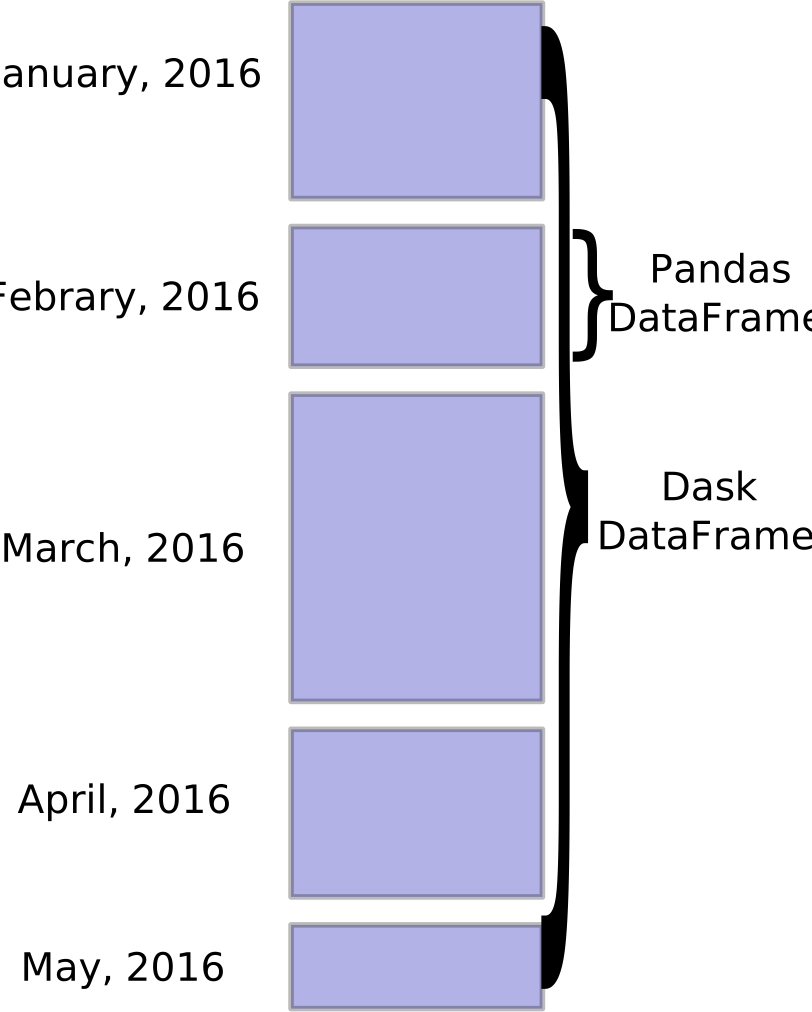
Dask dataframes coordinate many Pandas arrays arranged along an index. These Pandas dataframes may live on disk or on other machines.
Common Uses
Dask dataframes are commonly used to quickly inspect and analyze large volumes of tabular data stored in CSV, HDF5, or other tabular formats. This includes experimental data, financial data, or any other case where you have many heterogeneously typed columns that don’t fit into memory.
Dask.dataframe copies the pandas API
Because the dask.dataframe application programming interface (API) is a
subset of the pandas API it should be familiar to pandas users. There are some
slight alterations due to the parallel nature of dask:
>>> import dask.dataframe as dd
>>> df = dd.read_csv('2014-*.csv')
>>> df.head()
   x  y
0  1  a
1  2  b
2  3  c
3  4  a
4  5  b
5  6  c

>>> df2 = df[df.y == 'a'].x + 1
As with all dask collections (for example Array, Bag, DataFrame) one triggers
computation by calling the .compute() method:
>>> df2.compute()
0    2
3    5
Name: x, dtype: int64
Scope
Dask.dataframe covers a small but well-used portion of the pandas API. This limitation is for two reasons:
- The pandas API is huge
- Some operations are genuinely hard to do in parallel (for example sort).
Additionally, some important operations like set_index work, but are slower
than in pandas because they may write out to disk.
The following class of computations works well:
- Trivially parallelizable operations (fast):
- Elementwise operations:
df.x + df.y,df * df - Row-wise selections:
df[df.x > 0] - Loc:
df.loc[4.0:10.5] - Common aggregations:
df.x.max(),df.max() - Is in:
df[df.x.isin([1, 2, 3])] - Datetime/string accessors:
df.timestamp.month
- Elementwise operations:
- Cleverly parallelizable operations (fast):
- groupby-aggregate (with common aggregations):
df.groupby(df.x).y.max(),df.groupby('x').max() - value_counts:
df.x.value_counts() - Drop duplicates:
df.x.drop_duplicates() - Join on index:
dd.merge(df1, df2, left_index=True, right_index=True) - Join with Pandas DataFrames:
dd.merge(df1, df2, on='id') - Elementwise operations with different partitions / divisions:
df1.x + df2.y - Datetime resampling:
df.resample(...) - Rolling averages:
df.rolling(...) - Pearson Correlations:
df[['col1', 'col2']].corr()
- groupby-aggregate (with common aggregations):
- Operations requiring a shuffle (slow-ish, unless on index)
- Set index:
df.set_index(df.x) - groupby-apply (with anything):
df.groupby(df.x).apply(myfunc) - Join not on the index:
dd.merge(df1, df2, on='name')
- Set index:
See DataFrame API documentation for a more extensive list.
Execution
By default dask.dataframe uses the multi-threaded scheduler.
This exposes some parallelism when pandas or the underlying numpy operations
release the global interpreter lock (GIL). Generally pandas is more GIL
bound than NumPy, so multi-core speed-ups are not as pronounced for
dask.dataframe as they are for dask.array. This is changing, and
the pandas development team is actively working on releasing the GIL.
In some cases you may experience speedups by switching to the multiprocessing or distributed scheduler.
>>> dask.set_options(get=dask.multiprocessing.get)
See scheduler docs for more information.
Limitations
Dask.DataFrame does not implement the entire Pandas interface. Users expecting this will be disappointed. Notably, dask.dataframe has the following limitations:
- Setting a new index from an unsorted column is expensive
- Many operations, like groupby-apply and join on unsorted columns require setting the index, which as mentioned above, is expensive
- The Pandas API is very large. Dask.dataframe does not attempt to implement many pandas features or any of the more exotic data structures like NDFrames